
Your new office’s internet seems fast, but a hidden cabling flaw or a single point of failure in the building’s infrastructure could cost you thousands per minute in downtime.
- True redundancy requires “path diversity,” not just multiple providers sharing the same physical conduit.
- Superficial speed tests are misleading; professional tools like iPerf3 reveal the actual throughput and stability under load.
- Outdated internal cabling (Cat5 or poorly terminated Cat6) can cap your gigabit connection at a mere 100Mbps.
Recommendation: Treat internet connectivity as a critical utility and perform a physical infrastructure audit before signing, not after.
You’ve found the perfect office space. The location is ideal, the rent is within budget, and the natural light is fantastic. During the tour, you ran a quick speed test on your phone, and the results looked great. It seems like a done deal. But this is precisely where catastrophic mistakes are made. For any business where internet access is tied to revenue—which is nearly every business today—relying on superficial checks is a gamble you can’t afford to take.
The common advice is to ask the landlord which fiber providers service the building. While a necessary first step, it barely scratches the surface. The real, business-ending risks aren’t listed on a provider’s brochure; they are hidden underground, inside the walls, and in the telecom closet. These are the single points of failure (SPOFs): a single fiber entry point, a shared underground conduit, or decade-old cabling that can bring your entire operation to a halt. Verifying a building’s internet is not a simple check; it’s a crucial act of financial risk mitigation.
But what if the key wasn’t just asking *what* is available, but conducting a technical audit of *how* it’s delivered? This guide abandons the platitudes and provides a network consultant’s framework for performing true due diligence. We will move beyond speed tests and provider lists to give you the tools and knowledge to audit physical entry points, conduct rigorous bandwidth testing, identify cabling bottlenecks, and analyze a building’s Wi-Fi infrastructure before you commit to a lease.
This article provides a structured approach to methodically de-risk your next commercial lease from a connectivity standpoint. The following sections will walk you through the critical checkpoints of a proper infrastructure audit, ensuring your business’s digital foundation is as solid as its physical one.
Table of Contents: How to Verify a Building’s Internet Reliability and Avoid a Disastrous Lease
- Why Does Having Only One Fiber Entry Point Risk Your Company’s Operations?
- How to Perform a Rigorous Bandwidth Test During an Office Tour?
- Dedicated Line vs Shared Fiber: Which Is Necessary for a Video Production Agency?
- The Cabling Oversight That Caps Your Gigabit Speed at 100Mbps
- How to Eliminate Wi-Fi Dead Zones in Offices with Thick Concrete Walls?
- Why Does a “Single Point of Failure” Still Exist in 60% of Corporate Networks?
- The Connectivity Mistake That Drives 40% of Gen Z Shoppers Out of Your Store
- How to Design a Tech Infrastructure That Handles 10x Growth Without Crashing?
Why Does Having Only One Fiber Entry Point Risk Your Company’s Operations?
The single most dangerous assumption a tenant can make is that “fiber-lit building” means “reliable internet.” The critical question isn’t whether fiber reaches the building, but *how* it gets there and *how many different ways* it can enter. A single physical entry point for your internet connection is the definition of a Single Point of Failure (SPOF). An errant backhoe, a street-level fire, or even localized flooding can sever that one connection, taking your entire business offline. The financial impact is immediate and staggering, as unplanned downtime now costs businesses an average of $14,056 per minute.
Many landlords will tout “provider diversity,” meaning you can choose between two or more carriers. However, this is often a dangerously misleading claim. True redundancy comes from path diversity. As one analysis on network redundancy points out, a business can have service from two different providers, but if both fiber strands run through the same underground conduit to enter the building, a single physical incident will take out both connections simultaneously. This false redundancy gives a sense of security while offering no real protection.
During your pre-lease audit, you must physically inspect the building’s telecom room or basement to identify where the conduits enter. Are there multiple, physically separate entry points on different sides of the building? Ask the building manager for a “Letter of Authorization” (LOA) to inquire with carriers about the specific routing of their fiber. A refusal or inability to provide this information is a major red flag, indicating a potential lack of true infrastructure resilience.
How to Perform a Rigorous Bandwidth Test During an Office Tour?
Relying on a public speed test tool like Speedtest.net during an office tour is a rookie mistake. These tools measure the performance of the *current tenant’s* internet plan to a nearby public server, which tells you almost nothing about the building’s underlying infrastructure or the speed *you* will get. To perform a meaningful test, you must assess the raw network capacity from the office to the wider internet, bypassing as many variables as possible. This requires a professional tool like iPerf3.
iPerf3 is a command-line tool that measures the maximum achievable bandwidth between two points. By setting up a server instance on a cloud provider (like AWS or Google Cloud) and running the client from a laptop plugged directly into an ethernet port in the prospective office, you can measure true throughput. This method tests the entire path—from the wall jack, through the building’s wiring, to the ISP’s network and beyond. It reveals the real-world performance you can expect, not just a flattering, localized number.

A professional testing protocol goes beyond a single test. You should measure several factors to get a complete picture:
- TCP Throughput: This is the classic bandwidth test, measuring raw data transfer speed over a sustained period (e.g., 30 seconds).
- UDP Jitter and Packet Loss: This test is crucial for businesses reliant on real-time communication like VoIP or video conferencing. High jitter or packet loss will result in garbled calls and frozen video, even with high bandwidth.
- Parallel Streams: Running the test with multiple parallel streams simulates a busy office environment with many users accessing the internet simultaneously, testing how the connection holds up under load.
Dedicated Line vs Shared Fiber: Which Is Necessary for a Video Production Agency?
As the global Fiber to the Office market is expanding at 10.80% CAGR, more buildings are offering “gigabit speeds.” However, for businesses with demanding data needs, like a video production agency, the type of fiber is far more important than the advertised download speed. The crucial distinction is between shared fiber (often marketed as “business internet”) and Dedicated Internet Access (DIA). A video agency’s survival depends on uploading massive 4K and 8K video files, a task for which shared fiber is fundamentally unsuited.
Shared fiber plans are asymmetrical, meaning the upload speed is a small fraction of the download speed (e.g., 1Gbps down, but only 100Mbps up). It’s also a “best effort” service, where bandwidth is shared among multiple tenants, leading to variable performance during peak hours. In contrast, a DIA line provides a private, uncontended connection with symmetrical speeds (e.g., 1Gbps down and 1Gbps up). This is backed by a stringent Service Level Agreement (SLA) that guarantees uptime (typically 99.99%) and performance metrics like latency and jitter, with financial penalties for the provider if they fail to meet them.
For a video production agency, the choice is clear. The ability to reliably upload terabytes of footage against a deadline is not a luxury; it’s a core operational requirement. The higher cost of DIA is easily justified when weighed against the financial and reputational damage of a single missed deadline due to an upload bottleneck. The following table breaks down the critical differences.
| Feature | Dedicated Internet Access (DIA) | Shared Fiber | Impact for Video Production |
|---|---|---|---|
| Upload Speed | Symmetrical (1Gbps up/down) | Asymmetrical (1Gbps down/100Mbps up) | Critical for large file uploads |
| SLA Guarantee | 99.99% uptime with penalties | Best effort, no guarantees | Ensures deadline reliability |
| Jitter | <1ms consistent | 5-20ms variable | Affects real-time collaboration |
| Burstable Bandwidth | Available on-demand | Not available | Perfect for project deadlines |
| Monthly Cost (1Gbps) | $1,500-3,000 | $200-500 | ROI positive for agencies >10 people |
The Cabling Oversight That Caps Your Gigabit Speed at 100Mbps
You’ve secured a gigabit fiber line to the building, but your computers are only connecting at 100Mbps. The culprit is often not the provider but an invisible bottleneck within the office walls: the ethernet cabling. This is one of the most common and frustrating infrastructure problems, where the “last 100 feet” of wiring undoes the entire investment in high-speed internet. The two primary suspects are outdated cable standards or, more insidiously, improper installation.
Older buildings may still have Category 5 (Cat5) cabling, which is only rated for 100Mbps speeds. Even in buildings with modern Category 6 (Cat6) or Cat6a wiring capable of 1Gbps and 10Gbps respectively, poor termination by the installer can cripple performance. Gigabit ethernet requires all 8 wires (4 twisted pairs) inside the cable to be properly connected at the wall jack and patch panel. It is alarmingly common for installers to cut corners and only connect 4 of the 8 wires, which is sufficient for 100Mbps but physically incapable of carrying a gigabit signal.
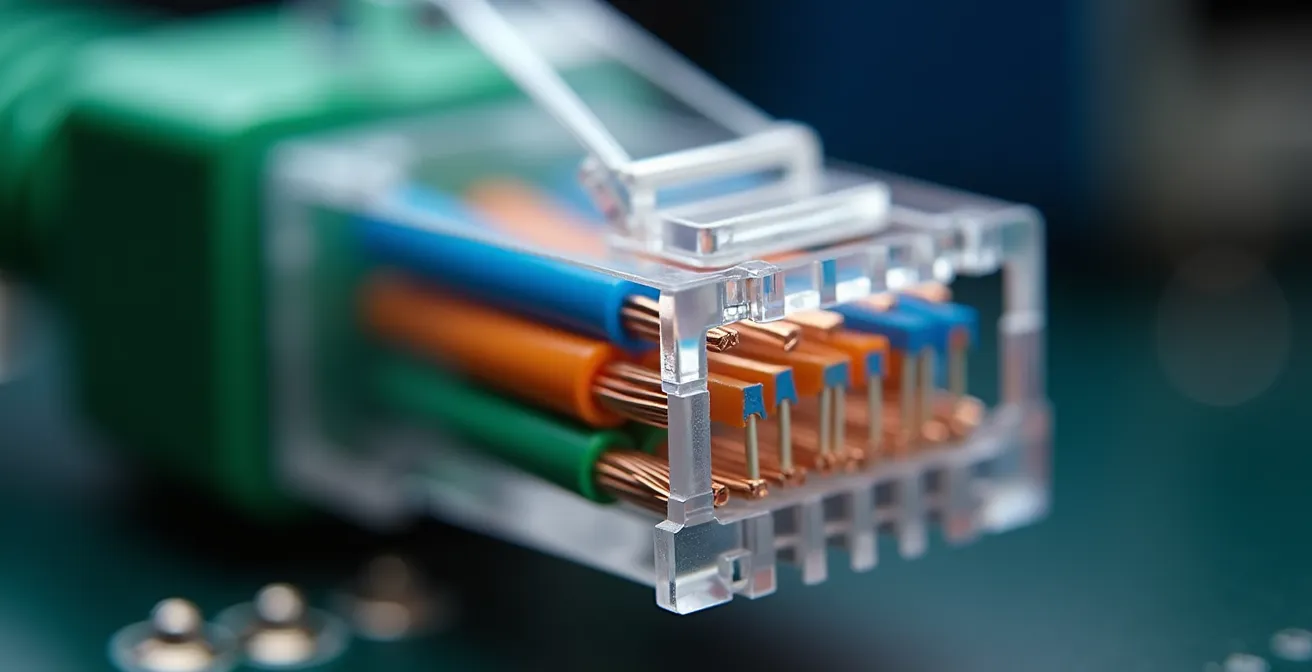
A tenant cannot afford to discover this after signing a lease and moving in, as re-cabling an entire office is an expensive and disruptive process. This check must be part of your pre-lease due diligence. Fortunately, a basic audit can be performed with inexpensive tools. By testing the wall jacks, you can verify the physical integrity of the wiring and ensure it can deliver the speeds you are paying for.
Your Action Plan: DIY Cabling Audit Protocol
- Equipment needed: Purchase a basic network cable tester ($30-50) that can verify the connection of all 8 pins.
- Physical Pin Test: Use the cable tester on a representative sample of wall jacks throughout the space to confirm all 8 pins are correctly terminated.
- Negotiated Speed Check: Connect a laptop directly to a wall jack with a known-good cable and check the negotiated link speed in your operating system’s network settings. It should read 1.0 Gbps, not 100 Mbps.
- Actual Throughput Test: Run an iPerf3 bandwidth test (as detailed in the previous section) to confirm that the actual data throughput matches the negotiated speed.
- Identify Red Flags: If the negotiated speed consistently caps at 100Mbps across multiple jacks, it is a strong indicator that the building’s cabling is either outdated or improperly installed, a major issue that needs to be addressed with the landlord before any lease is signed.
How to Eliminate Wi-Fi Dead Zones in Offices with Thick Concrete Walls?
Excellent wired connectivity is only half the battle. In a modern, mobile-first workplace, reliable Wi-Fi is just as crucial. A common complaint after moving into a new office is the discovery of “dead zones”—areas where the Wi-Fi signal is weak or non-existent. These are often caused by the building’s construction materials. Thick concrete walls, steel support beams, metal-backed insulation, and even elevator shafts can block or reflect Wi-Fi signals, creating frustrating pockets of poor connectivity.
Proactively identifying these potential dead zones during a tour is essential. Rather than just seeing if your phone can connect, you should use a Wi-Fi analyzer app to perform a predictive site survey. These apps provide a quantitative measurement of signal strength in decibels-milliwatts (dBm). This is the metric professionals use. A signal between -30 dBm and -50 dBm is excellent. A signal between -50 dBm and -67 dBm is reliable for most business tasks. However, any area where the signal drops below -70 dBm is a likely dead zone that will require an additional Wireless Access Point (AP) to cover.
Beyond signal measurement, a physical inspection for Wi-Fi readiness is critical. You must identify if the necessary infrastructure is in place to add APs where they will be needed. This involves looking for more than just power outlets.
- Ceiling Ethernet Drops: Look for existing ethernet ports in the ceiling tiles or high on the walls. These are essential for mounting APs in optimal locations for signal propagation. The absence of these drops means expensive cable runs will be required.
- Signal-Blocking Materials: Note the location of potential RF (Radio Frequency) “shadows” created by elevator shafts or large metal filing cabinets. Check for metallic-backed insulation in the ceiling or wire mesh in plaster walls (common in older buildings), which are notorious Wi-Fi killers.
- Telecom Closet Space: Ensure there is adequate space, power, and cooling in the telecom closet for the network switches and controllers needed to run a robust Wi-Fi system.
Why Does a “Single Point of Failure” Still Exist in 60% of Corporate Networks?
Despite the known risks, a surprising number of businesses operate with multiple single points of failure (SPOFs) within their network. The primary reason is almost always a misguided attempt at cost savings. The upfront expense of redundant hardware is a clear line item on a budget, while the potential cost of an outage is an abstract risk—until it happens. For small businesses, an outage can cost between $137 and $437 per minute, a price that far outweighs the investment in redundancy.
The challenge for IT leaders is a failure to communicate this risk in business terms. The finance department sees a request for a second firewall as an unnecessary expense, not as an insurance policy against operational collapse. The solution lies in reframing the conversation from a technical need to a financial one.
IT is a cost center and finance denies redundancy requests. The solution is to translate the technical risk of a SPOF into the financial language of ROI and risk mitigation that a CFO will understand.
– Network Architecture Best Practices, Flowroute Blog on Network Redundancy
A comprehensive infrastructure audit must look beyond the ISP connection and identify all potential SPOFs within the building’s and the company’s own network. This includes not just the internet connection but also the internal hardware that distributes it. A redundant internet connection is useless if it runs through a single, non-redundant firewall or core switch that fails.
The following table outlines common hidden SPOFs that must be audited in any prospective office space and within your own IT infrastructure plan.
| Component | Common SPOF Scenario | Business Impact | Redundancy Solution |
|---|---|---|---|
| ISP Connection | Single fiber entry | Complete internet outage | Dual diverse paths |
| Firewall | One device, no failover | Security and access failure | HA pair configuration |
| Core Switch | Single switch for all VLANs | Total network collapse | Stacked switches or dual core |
| Power | No UPS or single power feed | Instant shutdown on outage | Dual power supplies + UPS + generator |
| Cooling | Single HVAC for server room | Thermal shutdown in hours | N+1 cooling redundancy |
The Connectivity Mistake That Drives 40% of Gen Z Shoppers Out of Your Store
For modern retail and hospitality businesses, internet connectivity is no longer a back-office utility; it is a critical, customer-facing component of the in-person experience. The assumption that customers will tolerate poor or non-existent guest Wi-Fi is a costly mistake, particularly with younger demographics. For Gen Z shoppers, the digital and physical worlds are intertwined. They rely on in-store connectivity to look up product reviews, compare prices, and share their experience on social media in real-time.
When a store’s guest Wi-Fi is slow, unreliable, or has a cumbersome login process, it creates a point of friction that directly impacts sales. A shopper unable to load a review for a product in their hand is more likely to abandon the purchase and leave the store. This isn’t just a minor inconvenience; it’s a tangible loss of revenue. Retailers must recognize that robust digital infrastructure is as important as store layout or lighting. The in-store experience is now a digital one, and a poor connection can drive customers to competitors with a better, more seamless digital environment.
This principle extends beyond guest Wi-Fi. The store’s own operational network is equally vital. Modern point-of-sale (POS) systems, inventory management tools, and even in-store digital signage are all cloud-connected. An internet outage can grind all operations to a halt, making it impossible to process payments or check stock. This not only loses immediate sales but also damages the brand’s reputation for reliability. Therefore, ensuring the retail location has redundant, resilient internet connectivity is not just an IT concern—it’s a fundamental pillar of customer experience and business continuity.
Key Takeaways
- A “Single Point of Failure” (SPOF) in your connectivity—like a single fiber entry—is the number one hidden financial risk in a commercial lease.
- You must audit for physical “path diversity,” not just “provider diversity.” Two carriers using the same physical conduit into a building is not true redundancy.
- Test the integrity of the in-wall cabling with a dedicated tester. Do not trust building labels or landlord claims, as a simple termination error can cripple a gigabit connection.
How to Design a Tech Infrastructure That Handles 10x Growth Without Crashing?
The final and most strategic part of your pre-lease due diligence is future-proofing. The office you choose today must support your business not just on day one, but three, five, or even ten years from now. Designing for scalability means making choices based on future potential, not just current needs. With trends showing that fiber is expected to reach 80% of U.S. households by 2028, the enterprise standard will only become more demanding. A building that is not prepared for this future is a liability.
A scalability-first approach applies to every aspect of your infrastructure audit. It means choosing a building with access to multiple fiber providers, even if you only start with one. It means ensuring your contract allows for on-demand bandwidth upgrades without requiring a new physical installation. And it means standardizing on high-capacity internal cabling (Cat6a minimum) everywhere, even for areas that currently have low demand. These decisions add minimal upfront cost but provide enormous future flexibility, preventing expensive and disruptive upgrades down the line.
Modern technologies like SD-WAN (Software-Defined Wide Area Network) are also key to scalable design. SD-WAN allows a business to intelligently bond and manage multiple internet connections from different providers (e.g., a primary fiber line and a 5G wireless backup). It can automatically route critical traffic (like VoIP calls) over the most stable connection and balance loads, ensuring high performance and seamless failover. Choosing a building that can support these diverse connection types is essential for implementing a truly modern, resilient, and scalable network architecture.
- Lease for Space: Choose a building that already has multiple fiber providers in its telecom room, even if you plan to start with only one.
- Contract for Scalability: Your ISP contract should allow for instant bandwidth upgrades (e.g., from 100Mbps to 1Gbps) through software, without needing another truck roll.
- Standardize Cabling: Use Cat6a cabling as a minimum standard for all new installations to support future 10Gbps needs.
- Document Meticulously: Label every cable, port, and connection both physically and in a shared spreadsheet. Future troubleshooting will depend on this.
- Plan for Physical Growth: Ensure the telecom room has at least double the rack space you currently need, along with sufficient power and cooling for future hardware.
To ensure your next move supports your business instead of hindering it, apply this due diligence framework rigorously. The small investment in time and resources to conduct a proper technical audit now will prevent catastrophic operational failures and financial losses later.